Industrial Metal Texture Pack: A Rugged Design Resource for Creative Professionals
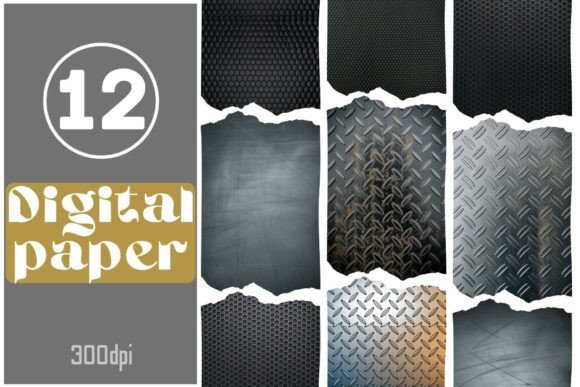
For creators who want to add a touch of industrial strength and authenticity to their projects, the Industrial Metal Texture Pack is a must-have. This collection features 12 high-resolution digital papers showcasing rugged textures like diamond plate, brushed metal, and honeycomb grids. Designed with tech-themed scrapbooking, packaging, journaling, and digital backgrounds in mind, it offers an excellent way to elevate your visuals without breaking the bank or sacrificing quality.
What You Need to Know About the Industrial Metal Texture Pack
The Industrial Metal Texture Pack is more than just a set of images—it's a versatile toolkit that brings metallic surfaces and industrial aesthetics to life. Each texture is delivered as a 300dpi JPEG file, ensuring crisp detail whether used digitally or printed. The dimensions (3456 x 4608 pixels) provide ample space for scaling without loss of quality, making them suitable for both small-scale designs and large-format prints.
One standout feature is the inclusion of torn-edge previews. These give each texture a gritty, tactile appearance that’s perfect for simulating real-world materials in creative compositions. Whether you're designing product mockups, editorial spreads, or website banners, these textures can help you achieve a professional, no-nonsense look.
Common Mistakes When Using Industrial Textures
Despite its usefulness, many designers overlook key details when working with industrial textures like those found in this pack. Here are some common pitfalls to avoid:
- Ignoring resolution needs: While 300dpi is standard for print, not all uses require such high resolution. However, if you’re printing physical materials like packaging or signage, using lower-res versions could lead to pixelation and a lack of visual impact.
- Overusing the same texture: Applying the same metallic pattern across multiple design elements can create a repetitive look. Use textures strategically—such as on accents or background layers—to maintain visual interest without overwhelming the design.
- Misjudging lighting and color contrast: Industrial textures tend to have strong highlights and shadows. Failing to adjust colors or layer opacity accordingly can make text or other design elements hard to read or blend awkwardly into the background.
- Not checking compatibility: Some graphic software may handle high-resolution JPEGs differently. Always test how the textures render in your preferred design platform before finalizing any project.
How These Mistakes Impact Your Work
Underestimating the importance of resolution can cost time and money, especially if you need to reprint due to blurry output. Overuse of similar textures might lead to a design that feels cluttered rather than cohesive. Meanwhile, poor lighting and contrast choices can reduce readability and professionalism—critical for marketing materials or client presentations.
Imagine creating a promotional poster for a new line of hardware tools. If you apply too much brushed metal texture, the message might get lost under the reflective surface. Or, if you use a low-quality version of a diamond plate texture for a printed catalog, it could appear soft and unimpressive at retail displays. These oversights can affect brand perception and user experience.
Better Approaches to Using the Industrial Metal Texture Pack
To maximize the potential of the Industrial Metal Texture Pack, consider the following strategies:
- Layer wisely: Use textures as overlay layers to maintain the integrity of your base design. Adjust blending modes like Multiply or Overlay to see which gives the most realistic effect.
- Experiment with scale: Because the textures are large (3456 x 4608 pixels), don’t hesitate to zoom in or out depending on your project’s needs. Close-ups can highlight intricate patterns, while wide shots work well as background elements.
- Balance with subtlety: Apply textures selectively. For instance, adding a subtle honeycomb grid to a logo badge can suggest durability without overshadowing the logo itself.
- Consider print vs. digital: When using these textures for web-based content, optimize them by reducing file size. For printables or packaging, ensure they remain at full resolution for clarity.
Real-World Applications and Examples
Let’s take a practical example. Suppose you’re a blogger creating a post about DIY home automation kits. By incorporating a brushed metal texture into your header image, you instantly convey a sense of innovation and reliability. But instead of covering the entire page, you might apply it only to the title bar or button elements to keep the focus on your content.
Another scenario involves a small business owner launching a line of rugged outdoor gear. They could use the diamond plate texture in their packaging design to reflect the product’s durability. The torn-edge preview adds an extra layer of realism, helping customers visualize the item even before unboxing it.
Before You Buy: What to Check
Before committing to the Industrial Metal Texture Pack, evaluate a few key factors to ensure it aligns with your goals:
- Format suitability: JPEG files are great for most purposes, but if you need transparency or layered effects, you might prefer PNG formats. Make sure the provided format meets your editing requirements.
- License terms: Confirm what the license allows. Are you permitted to use the textures in commercial projects? Can they be resold or distributed? Knowing these details prevents legal issues down the road.
- Software compatibility: Test one or two textures in your workflow. Do they load quickly? Do they support advanced features like smart objects or layer masks?
- Design purpose: Think about whether the textures will enhance your message. For instance, using industrial textures in a children’s educational resource might clash with the intended tone.
Why This Pack Stands Out
Compared to generic texture collections, the Industrial Metal Texture Pack provides niche-specific value. It’s curated for creators who need a consistent, authentic industrial aesthetic across various mediums. From bloggers crafting infographics to marketers building product showcases, the textures here offer a level of realism that stock photos often miss.
Additionally, the fact that each texture comes with a torn-edge preview means you can simulate paper-like applications with metal finishes, opening up new avenues for creativity. Educators, for example, can use these textures to build interactive learning modules that mimic technical blueprints or engineering diagrams.
Final Thoughts on Choosing the Right Tool
Textures are powerful, but they should serve your design—not dictate it. The Industrial Metal Texture Pack is a fantastic resource when used thoughtfully. Avoid common missteps by understanding your project’s needs, testing the textures early in your workflow, and applying them in ways that enhance rather than obscure your message.
Whether you're a beginner exploring digital design or a seasoned pro looking to streamline your process, taking a moment to plan your texture usage can save hours of rework later. The right texture can transform a simple layout into something bold and memorable, and this pack delivers exactly that kind of impact.